Know which shops are due a restock today
The shops that need restocking, most overdue first, with opening hours so you do not drive across town to a closed door.
What you do today
You keep the visit order in your head, or in a notebook that has no idea which shops you skipped last week when it rained.
One concrete detail
A shop only enters the schedule once its products have a delivery frequency set; without one it never appears, and the dashboard lists those shops by name so the gap is visible rather than silent.
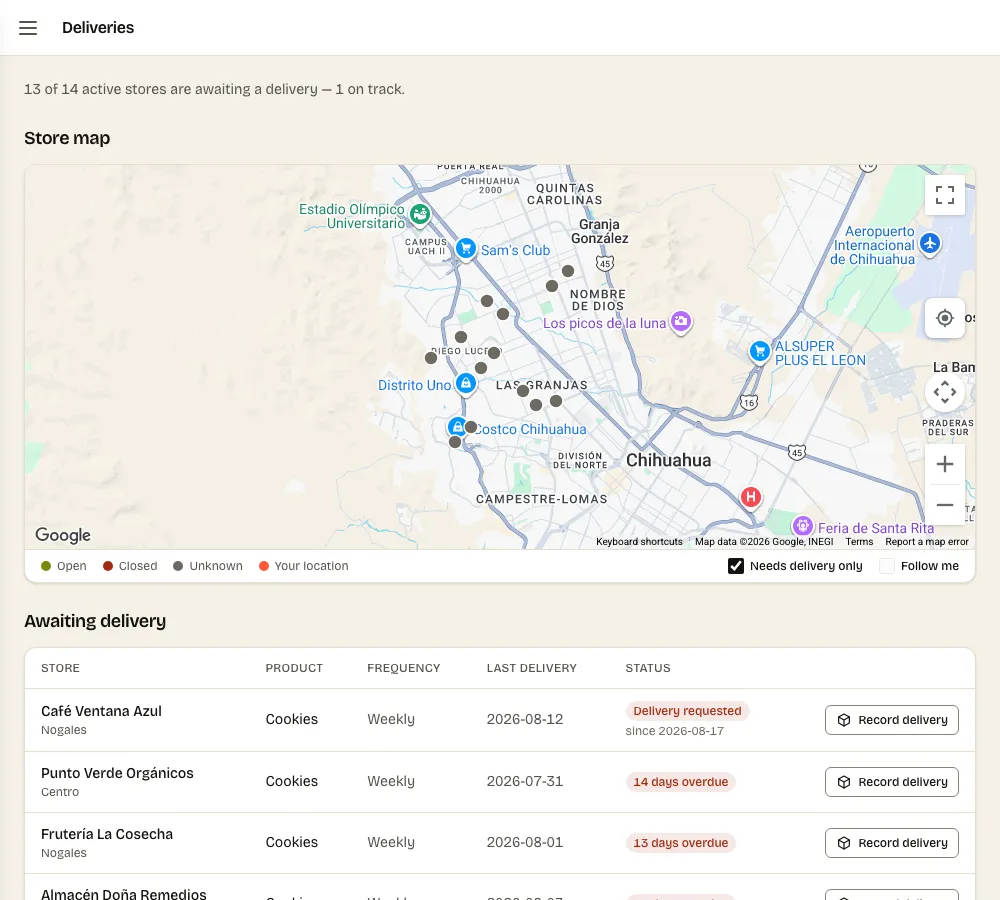
The question this answers is not “what is the fastest route”. It is the one you actually ask on a Tuesday morning: which shops need me today, and which have been waiting longest.
Overdue first
Each shop carries a delivery frequency — weekly, fortnightly, whatever you agreed. The round is ordered by how far past due each shop is, so the shop you have not visited in three weeks sits at the top rather than wherever it falls alphabetically.
The shops that never appear
A shop whose products have no frequency set never enters the schedule at all. That is the failure mode this feature guards against, because it is silent: the shop is not late, it is invisible, and you notice when the owner calls.
So the dashboard lists those shops by name, under a heading that says exactly what is wrong with them. A gap you can see is a gap you can close.
Common questions
- Does it plan a route for me?
- No. It tells you which shops are due and how overdue each one is. Which order you drive them in is a decision about traffic, parking and who is behind the counter today, and you know those better than a map does.
- What if a shop is closed when I get there?
- Opening hours show next to each shop, from the shop's own override or from Google. A shop with no hours from either source is listed on the dashboard so you can add them.